Load your exports
Drop your CSV exports here
Any of the five Rainbet history exports, in any order, all at once or one at a time.
Nothing is uploaded. These files are read by your own browser and never sent anywhere.
- Casino bet history
- Deposit transactions
- Withdrawal transactions
- Reward transactions
- Other transactions
Where to get these
-
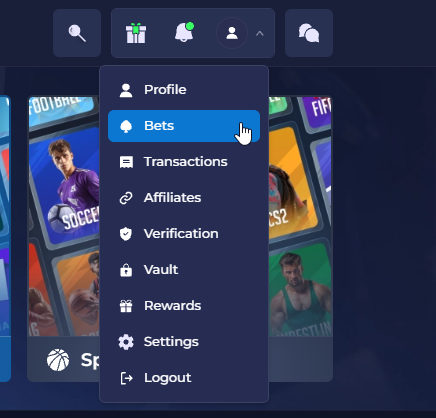
Open the account menu and choose Bets
Top right of the site, the person icon.
-
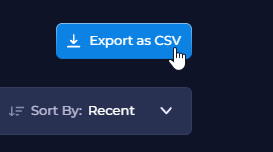
Click Export as CSV
This is the largest file, it may take a few minutes to process.
-
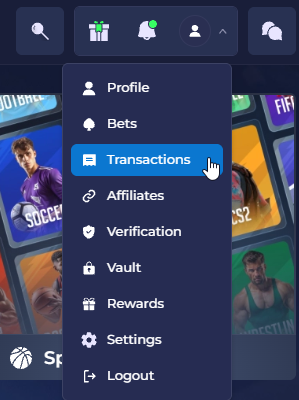
Go back to the menu, choose Transactions, and export each tab
Deposits, withdrawals, rewards and other transactions are four separate exports. The same Export as CSV button is on each.
-
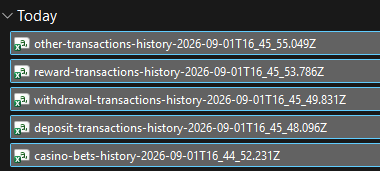
Drag all five out of your downloads and onto this page
Order does not matter, do not alter the names. You can choose to upload or withhold any of these files, if desired.
Reading
Wagered against returned, by month
Cumulative profit and loss
Rewards by month
Running total
Which account paid it
What it is worth
Every reward
Which accounts count as rewards
Payments from these accounts are counted as rewards for being under the code rather than as ordinary tips.
Counterparties in your export that are not on the list. Click one to add it. Ordered by how much they sent you.
Most wagered
All bets
Open a provider for its games, and a game for its bet sizes.Deposits against withdrawals, by month
The whole picture
Transfers, by kind
Tips received, by counterparty
By kind
Rakeback against turnover
Rewards by month
Game lookup
Date range
What was loaded
Exchange rates used
What the numbers do and do not include
Add another file
Loading a file of a kind already read replaces it.